Bale: Simplified Accounting and Inventory for India's Fabric Traders
Co-founding a product for fabric traders that replaces diary-and-Excel inventory with roll-level tracking, and routes daily accounting around TallyPrime without breaking the CA's workflow.
Context
India’s textile industry is a ₹20 lakh crore market, and 96% of production flows through fabric traders before it reaches end customers. These traders are the connective tissue of the industry. They buy raw fabric, coordinate processing like dyeing and embroidery through a network of vendors, and dispatch finished goods to their customers. Despite the scale and complexity of their operations, most of them manage inventory in diaries or Excel, and handle accounting through TallyPrime, a desktop software that was never designed for their day-to-day workflow.
Bale is a product I co-founded with a colleague to serve this specific segment. I’m the sole engineer and co-designer; my co-founder handles client research coordination and project management, and we make design decisions together. The product runs on Next.js, Supabase, and TypeScript.
How We Found the Problem
A mutual friend of ours is a fabric trader running a small operation. He manages inventory in a diary and uses Tally for accounting.
Through him, we started reaching out to more people in the space. Over two months, we spoke to more than ten fabric traders and garment manufacturers. The conversations ranged from hour-long video calls to in-person visits lasting close to two hours. The in-person visits gave us the most useful material.
What the Early Interviews Told Us
We spoke to three or four people before we started building anything. The early picture seemed clear: traders needed better inventory tracking. Fabric isn’t like retail merchandise you count in units. It comes in rolls, measured by meters or kilograms. Each roll has its own color, quality grade, manufacturing details, and current location. A single trader might have stock spread across two warehouses and ten or more vendor factories at any given time, with rolls in various stages of processing. Diary-keeping and Excel cannot hold this together reliably at scale.
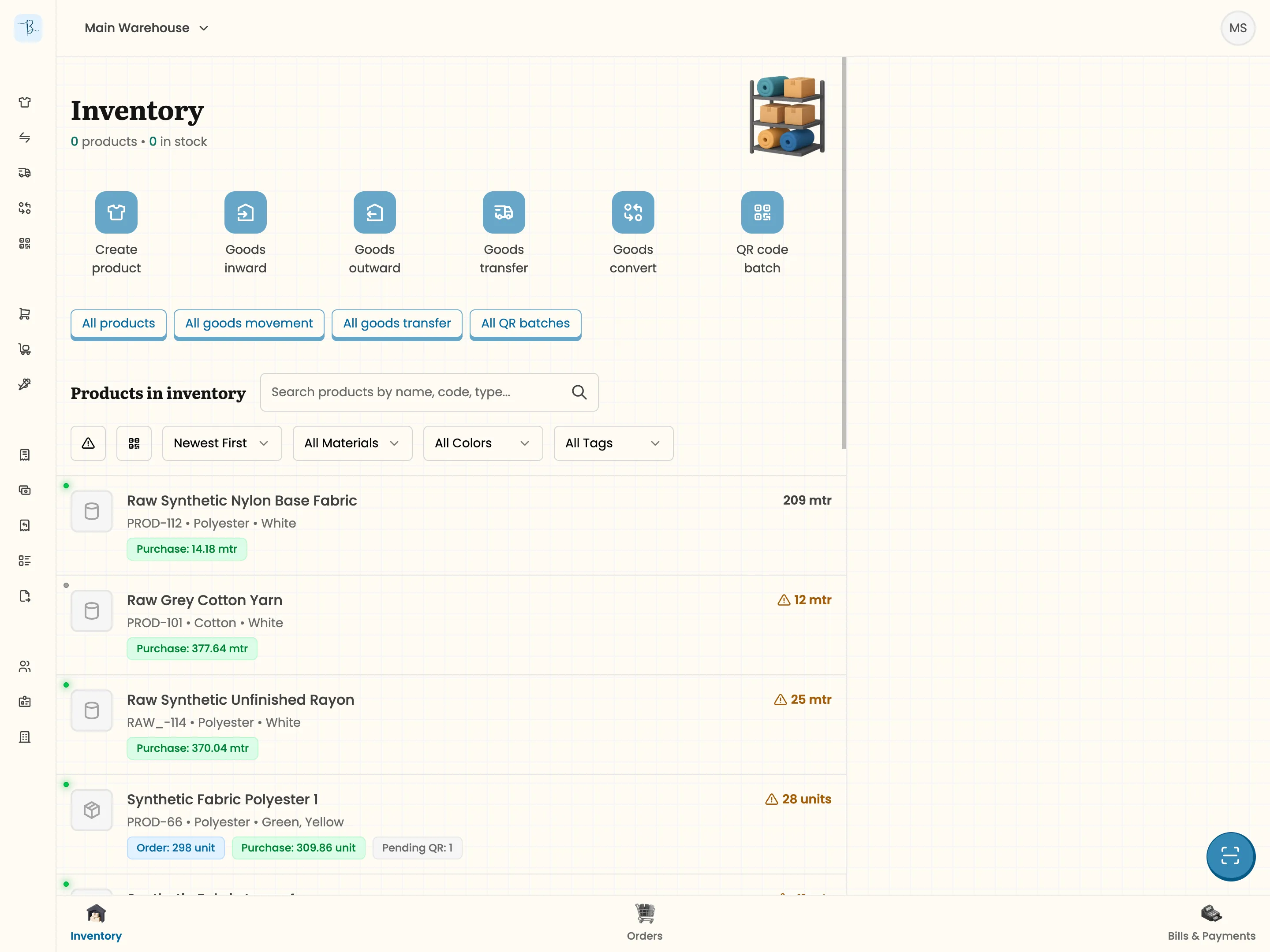
So we built the basics. Warehouses, stock management, goods inward and outward, and an orders module covering sales and purchase orders. The plan was to get something working, then use it as a conversation tool in future interviews. Instead of asking traders to imagine what they needed, we could show them something tangible and watch how they reacted.
From Inventory to Accounting
The reactions to the inventory system were positive. Traders liked the interface, especially the QR scanning and partial dispatch features. But across continued interviews, a different problem kept coming up: Tally.
Tally is the accounting standard in Indian business. Every CA expects Tally data for tax filing, and every trader uses it for invoicing. But Tally is a desktop application with a dated interface and a steep learning curve. It’s built for accountants, not for a fabric trader who needs to generate an invoice between customer meetings. During one in-person visit, we watched a trader create an invoice in Tally, save it to a cloud folder, ask his assistant to send the file to his WhatsApp, and then forward it to his customer from there. That is four steps for what should be a single action.
Another trader, a garment manufacturer in his late 30s who was technically savvy, had gone so far as to build custom modules inside Tally to handle his niche requirements. His saree manufacturing process involves multiple stages (washing, cutting, dyeing), each happening at a different vendor’s factory, and Tally has no built-in way to manage that flow. He’d essentially hacked the software to fit his business.
A third trader, the one with 10,000+ rolls across two warehouses, had a single accountant handling all of Tally. The business owner himself rarely touched the software because it was too complex for daily use.
The pattern was consistent: traders were locked into Tally because their CAs needed it for tax filing, but they wanted to stop interacting with it for everyday operations.
This shifted our product strategy entirely. We had set out to build an inventory management app. What we needed to build was simplified accounting that exports to TallyPrime, with fabric-specific inventory tracking built in. The inventory features were still valuable, but the core proposition had changed. Bale’s job is to let traders run their daily operations in a system designed for them, while maintaining seamless compatibility with the Tally ecosystem their CAs depend on.
Designing for Fabric-Specific Workflows
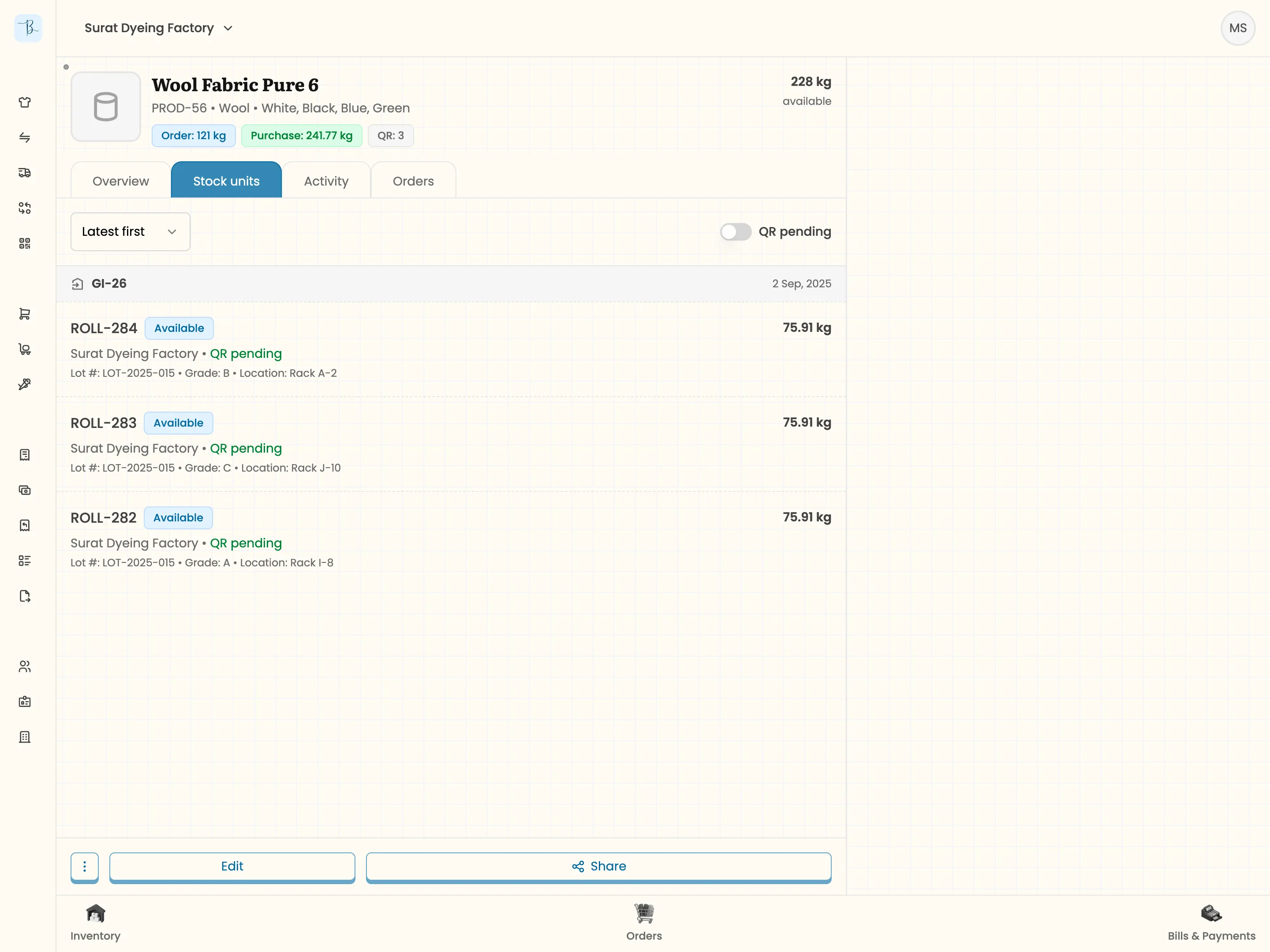
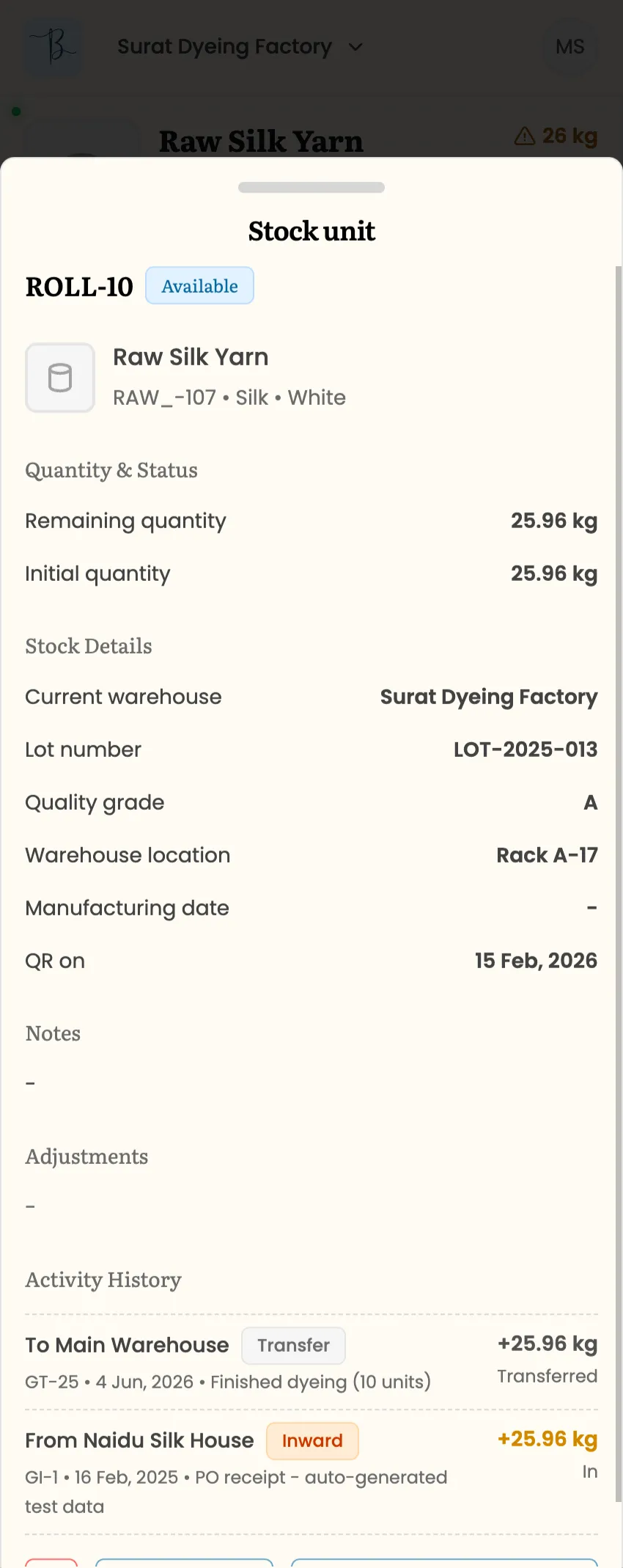
One of the earliest design decisions was how to model inventory. We landed on the first approach we considered because it mapped directly to how traders already think: every individual roll gets a unique ID. Each roll carries its own data, including current size, wastage, warehouse location, quality tags, and manufacturing identifiers. A user can tap on any roll and see its full history: where it was purchased, what processing stages it went through, and where it was dispatched.
We also needed to handle the fact that fabric traders don’t operate in a single unit of measurement. A business might purchase fabric by kilogram from suppliers but sell it by meter to customers. So the unit of measurement lives at the transaction level instead of as a company-wide setting.
For garment manufacturers, we used the same underlying model. In the backend, a garment batch is a stock unit, identical to a roll. The difference is entirely on the frontend: the unit is “pieces” instead of meters or kilograms, and the interface labels them as batches instead of rolls. This kept the system clean while serving both customer types.
QR Codes for the Warehouse Floor
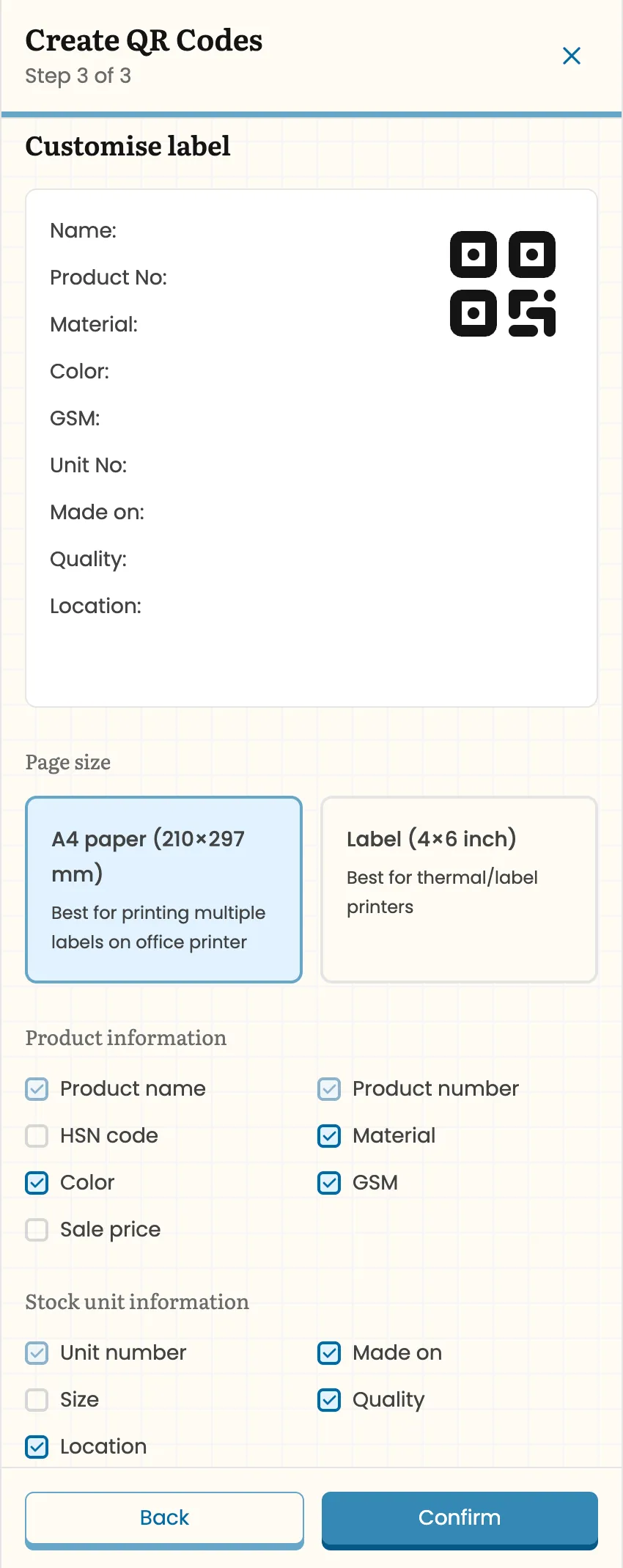
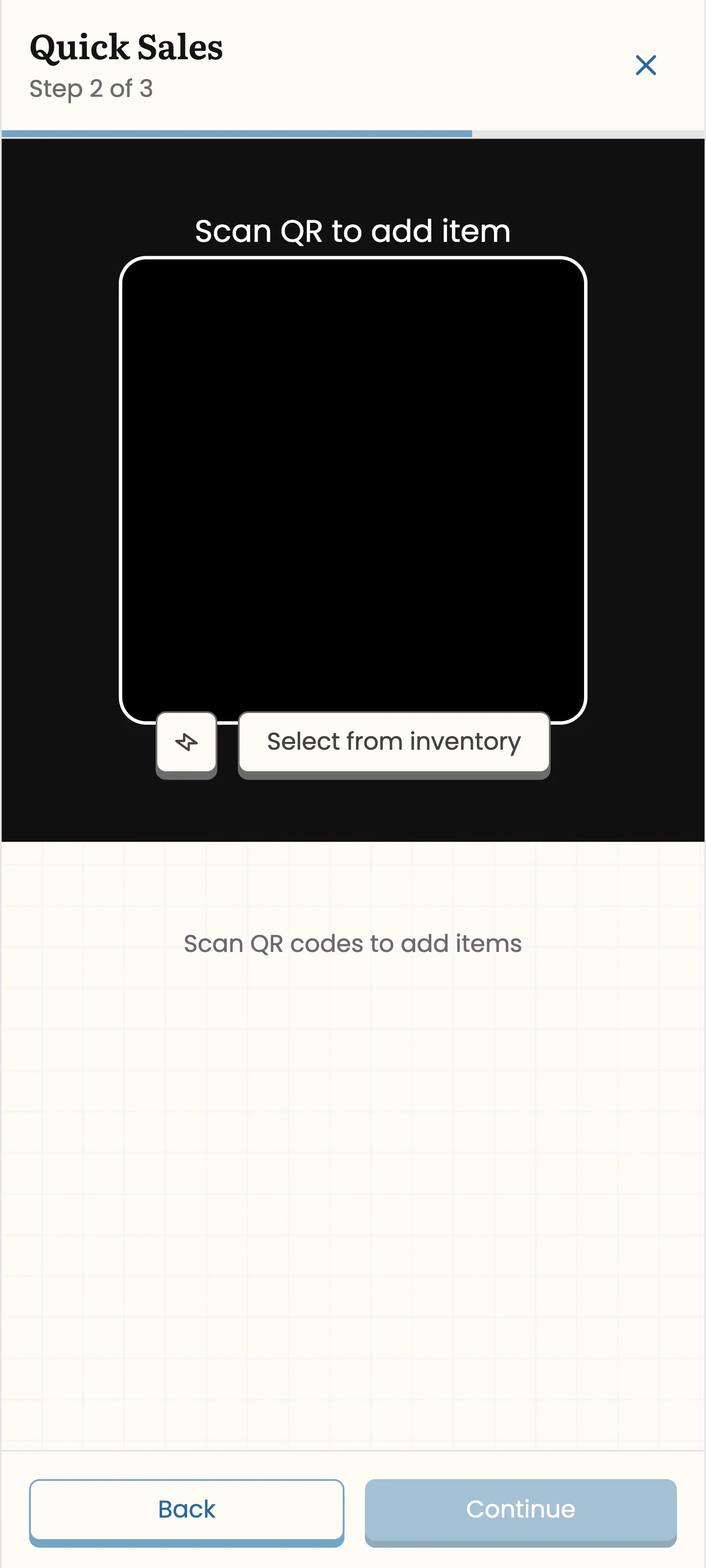
Several traders asked about QR-based tracking, and the ones who saw it in the app responded well to it. The system works like this: when a user inwards a batch of rolls into a warehouse, they can bulk-generate QR labels for all of them. They choose what information prints on the label (product name, color, roll number, quality) and whether to format it for A4 sheets or individual label paper. The labels download as a PDF for printing, and once attached to rolls, any scan pulls up the roll’s full information or lets the user quickly add it to a dispatch.
Quick Sale and Order Fulfillment
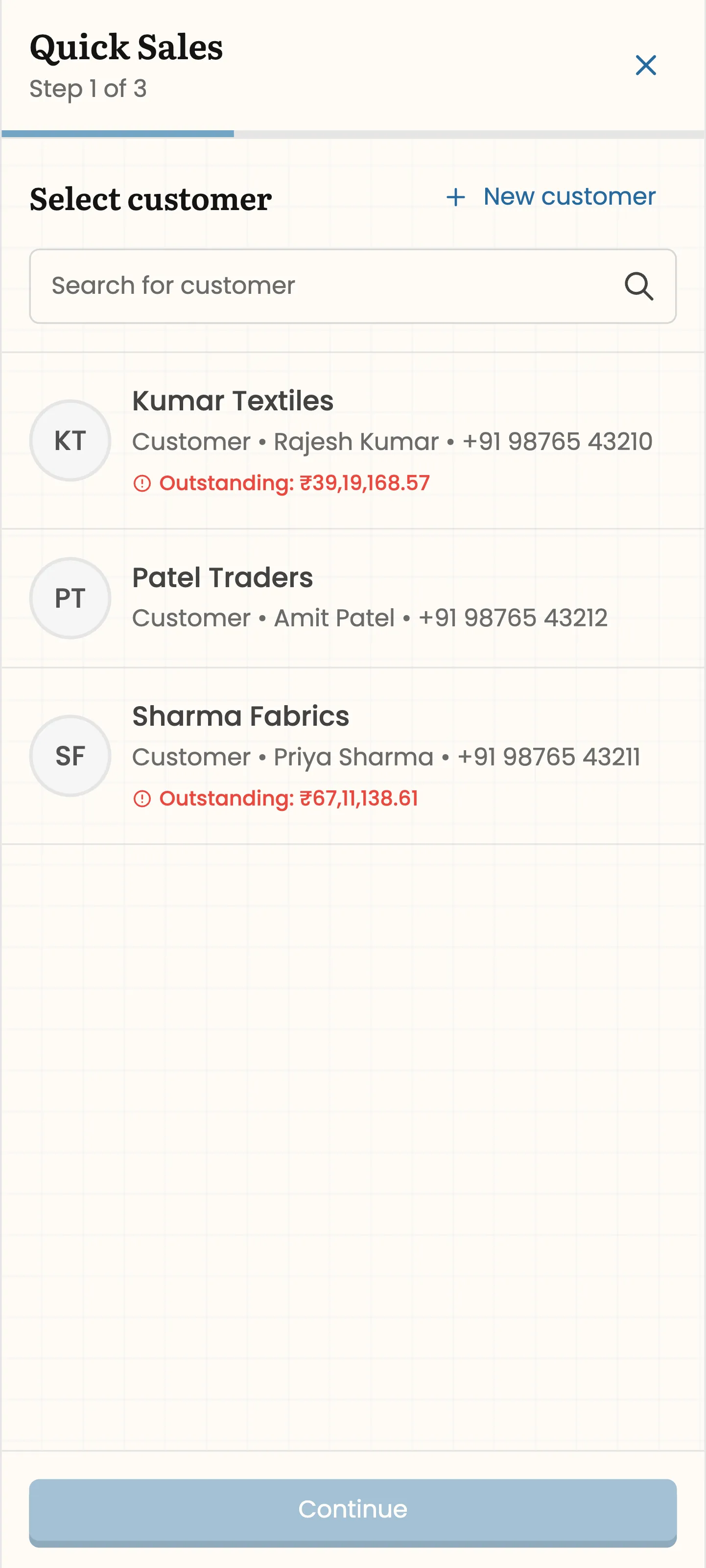
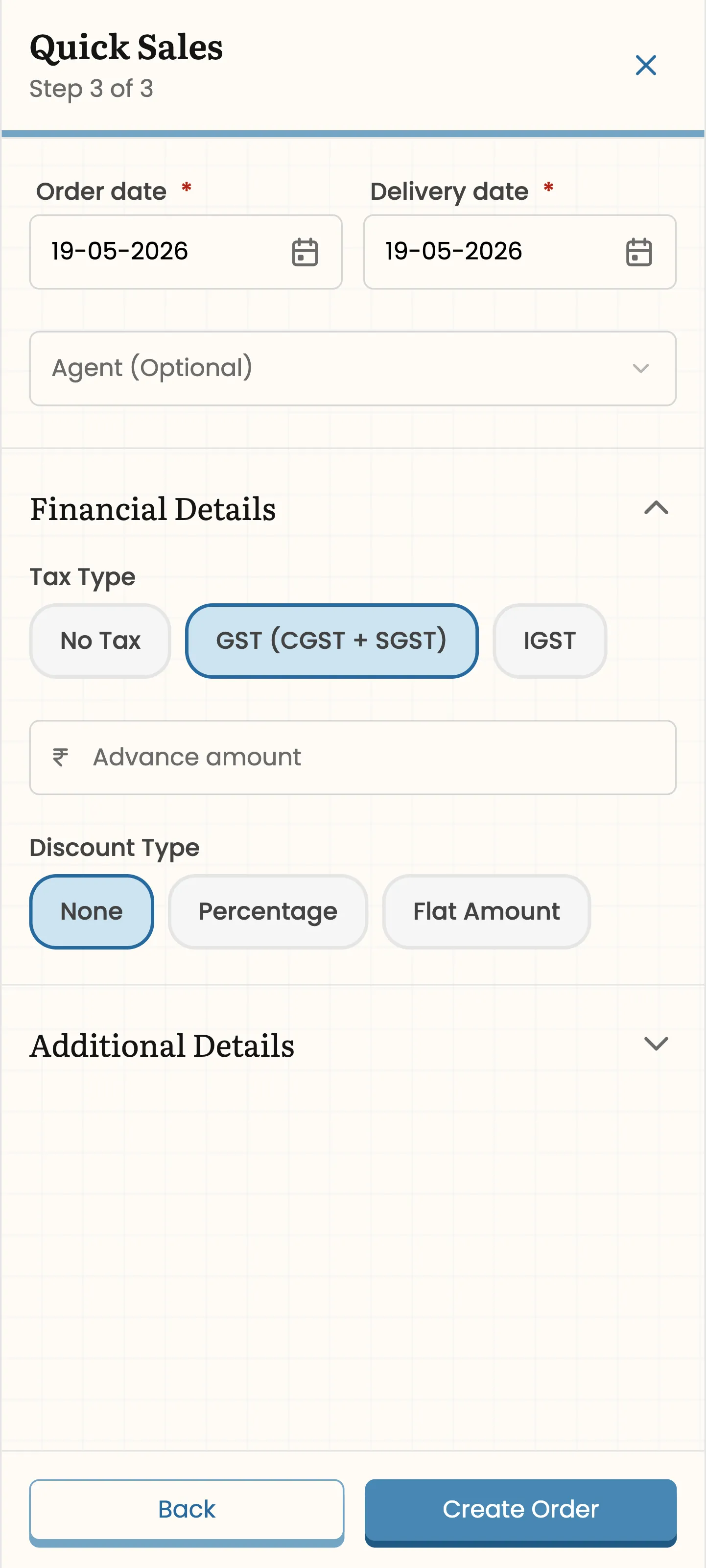
We also built a quick sale flow around the scanner. A walk-in customer shows up, the trader scans the rolls they want, selects or adds the customer, fills in the order details, and creates the sale. The system handles the rest in the background: it generates a sales order, creates the goods outward record, and marks everything as fulfilled. This is a fundamentally different workflow from ongoing orders, where a customer places a large order and the trader fulfills it in partial shipments over time as stock becomes available. Both patterns exist in the same business, so the system supports both: scan-and-go for walk-ins, and fulfillment tracking with multiple linked dispatches for regular orders.
Vendor Visibility
Fabric traders coordinate with a network of vendors for processing. One of our interviewees worked with over ten vendor factories. A roll of raw fabric might be sent to one vendor for dyeing, then to another for embroidery, before being dispatched to the end customer, sometimes directly from the vendor’s factory. The problem is visibility. Traders often have limited clarity on where their stock is across all these locations.
We solved this by treating vendor factories as warehouses in the backend. When a trader sends stock to a vendor, they create a goods transfer, which moves the roll’s location in the system from their warehouse to the vendor’s factory. At any point, the trader can see exactly how much stock is sitting at each vendor. This was a direct response to what we observed in interviews: the uncertainty of not knowing where rolls were, especially when dealing with dozens of processing partners.
Job Work Tracking
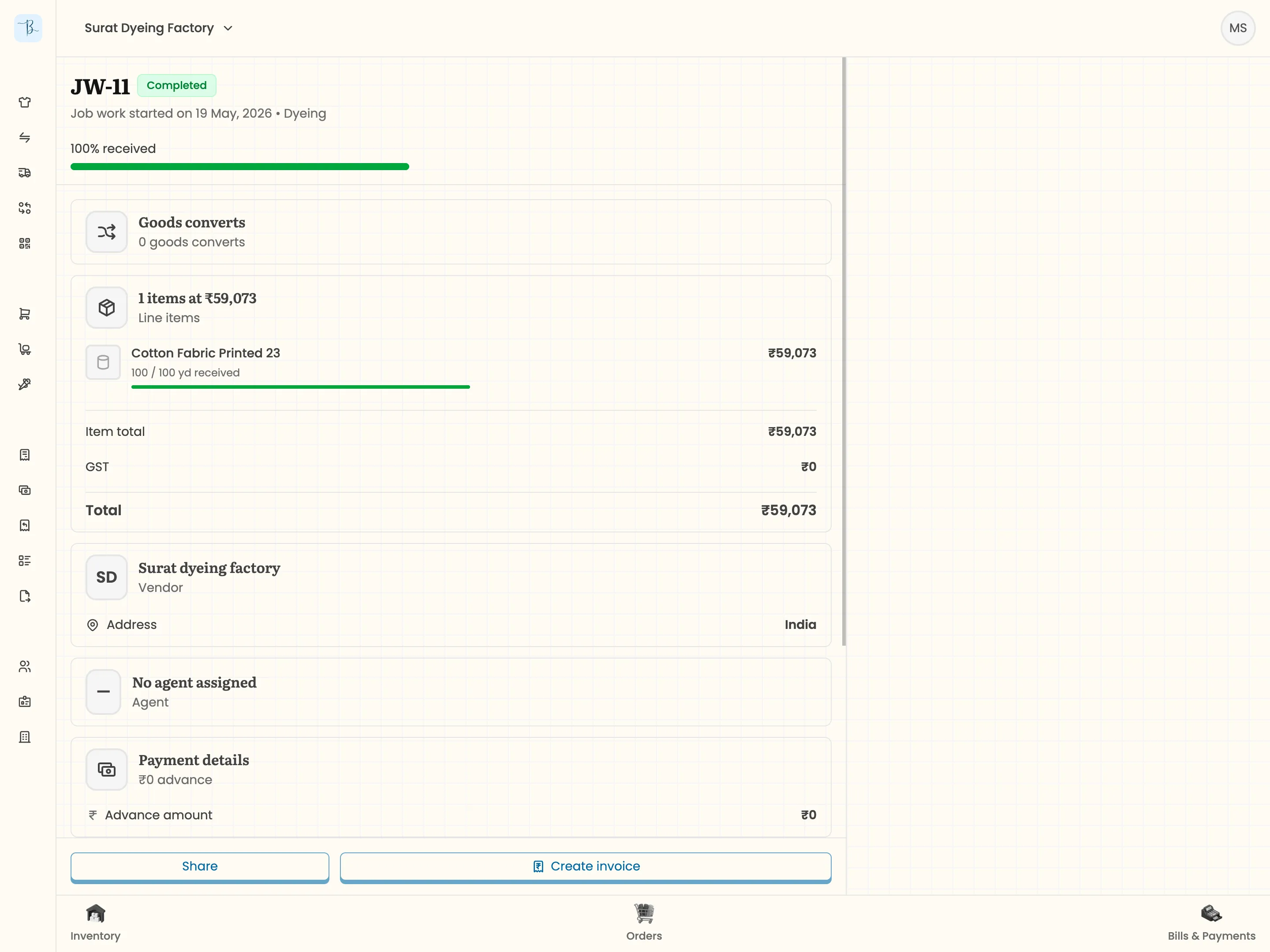
Job work tracking sits on top of this. When a vendor completes processing on a batch of rolls, the trader creates a goods convert record. This consumes the input rolls (raw fabric) and creates output rolls (processed fabric) in the system, maintaining the full trail. If a roll comes back defective, the trader can trace it backward through every stage of processing to identify where the problem occurred. This traceability was explicitly requested by traders who had been burned by quality issues with no way to pinpoint the source.
Accounting: Three Things, Done Simply
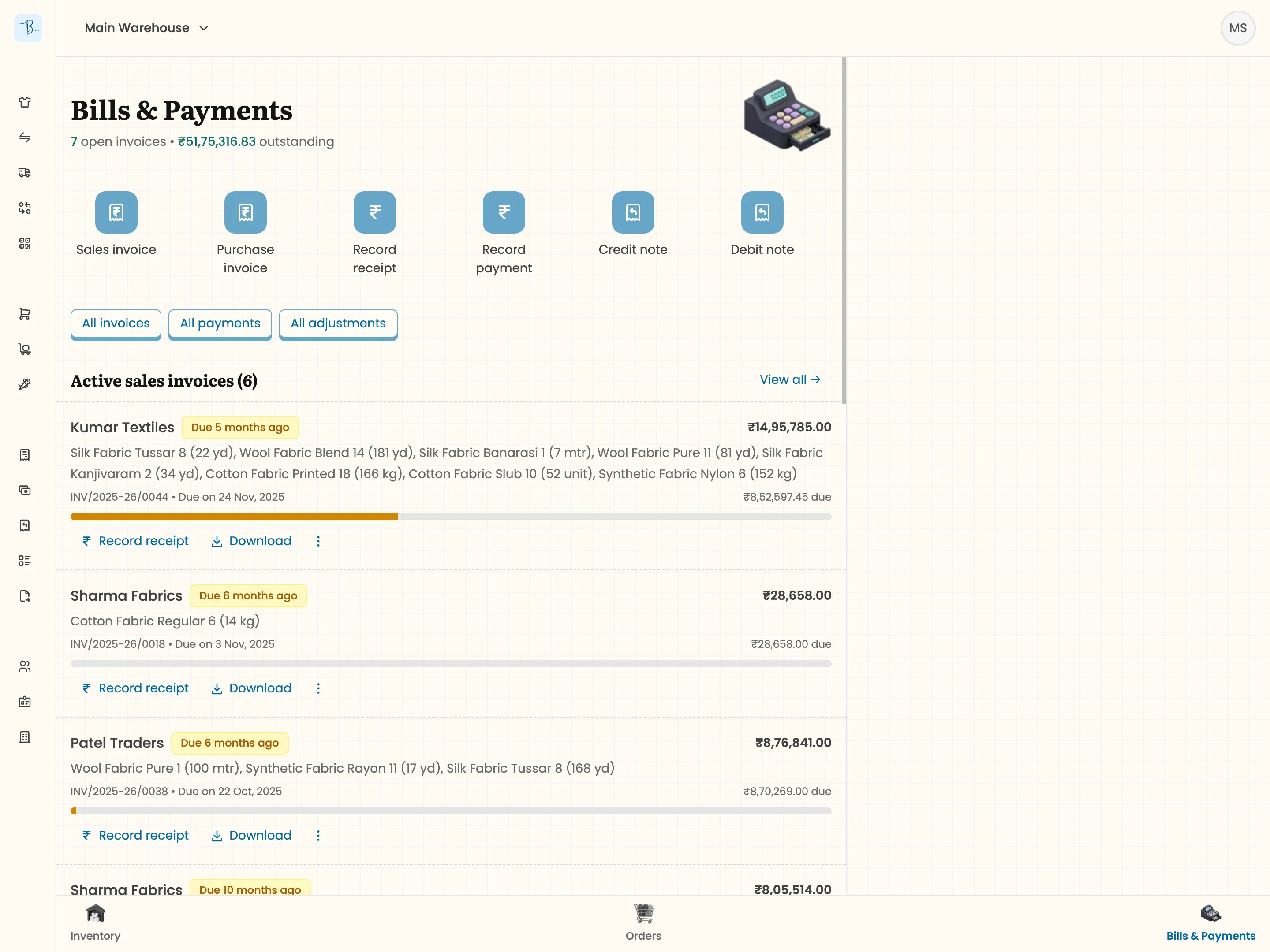
The accounting module covers the three things traders actually need on a daily basis: invoices (sales and purchase), adjustment notes (credit and debit), and payments (receipts and outgoing). We learned a lesson early here. We initially built adjustment notes as product-wise records, which seemed logical from a system design perspective. Traders corrected us. They work with amount-wise adjustments.
Our invoices are a little different from standard billing software. They allow users to track fulfillment by linking payments and adjustment notes directly to each invoice, giving a clear picture of what’s been paid, what’s been adjusted, and what’s outstanding.
The critical feature is export. Users can export all their accounting records (invoices, adjustments, payments) as TallyPrime-compliant XML. Their CA imports the file directly into Tally. Each person uses the tool that fits their expertise.
Letting Go of Simplicity
When we started, we had a design philosophy: keep the interface minimal. No left menu, no bottom navigation, just a focused inventory app. That lasted until reality caught up. Once we added accounting and orders alongside inventory, the stripped-down approach became unworkable. We had to build a proper navigation system.
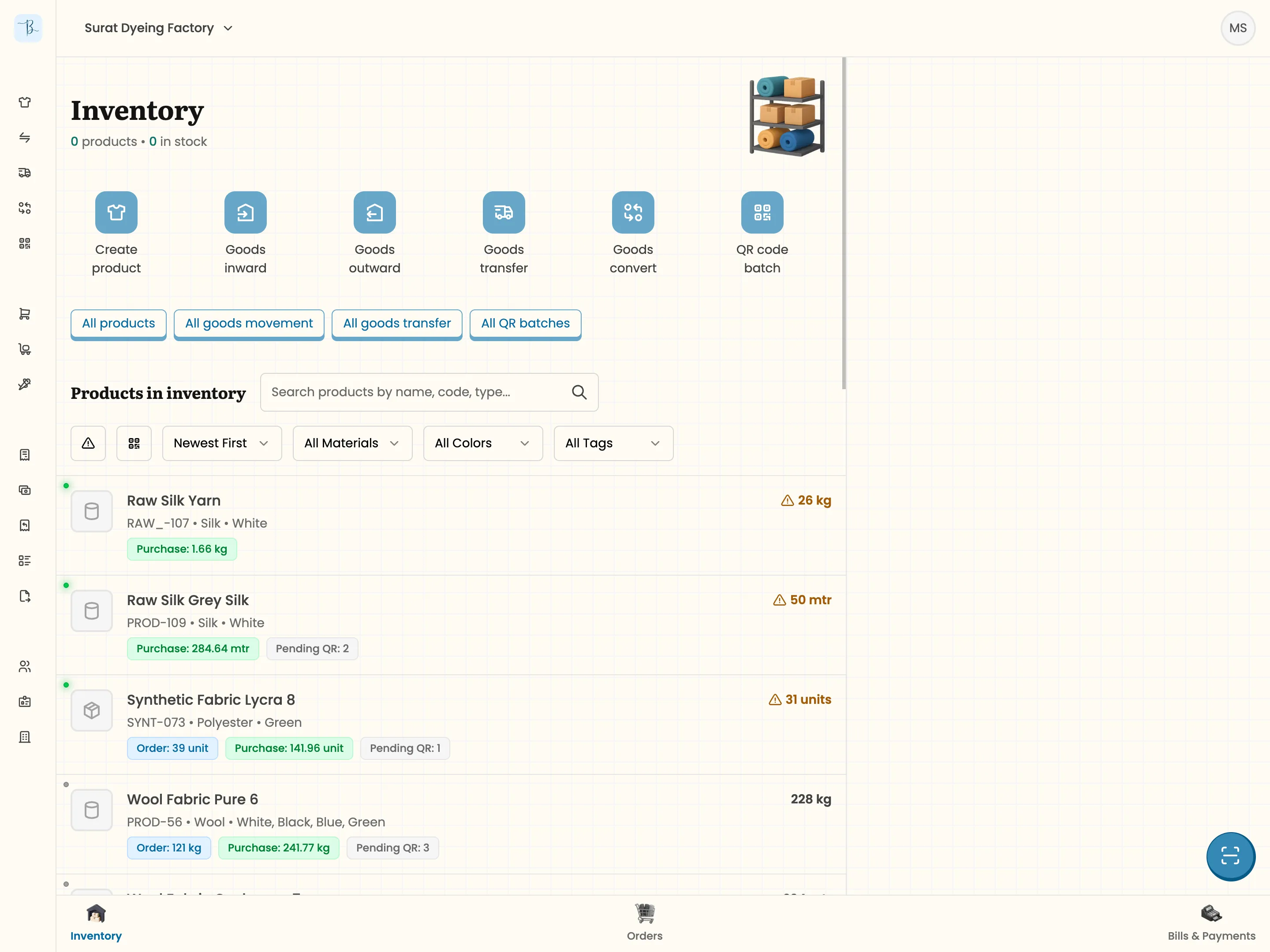
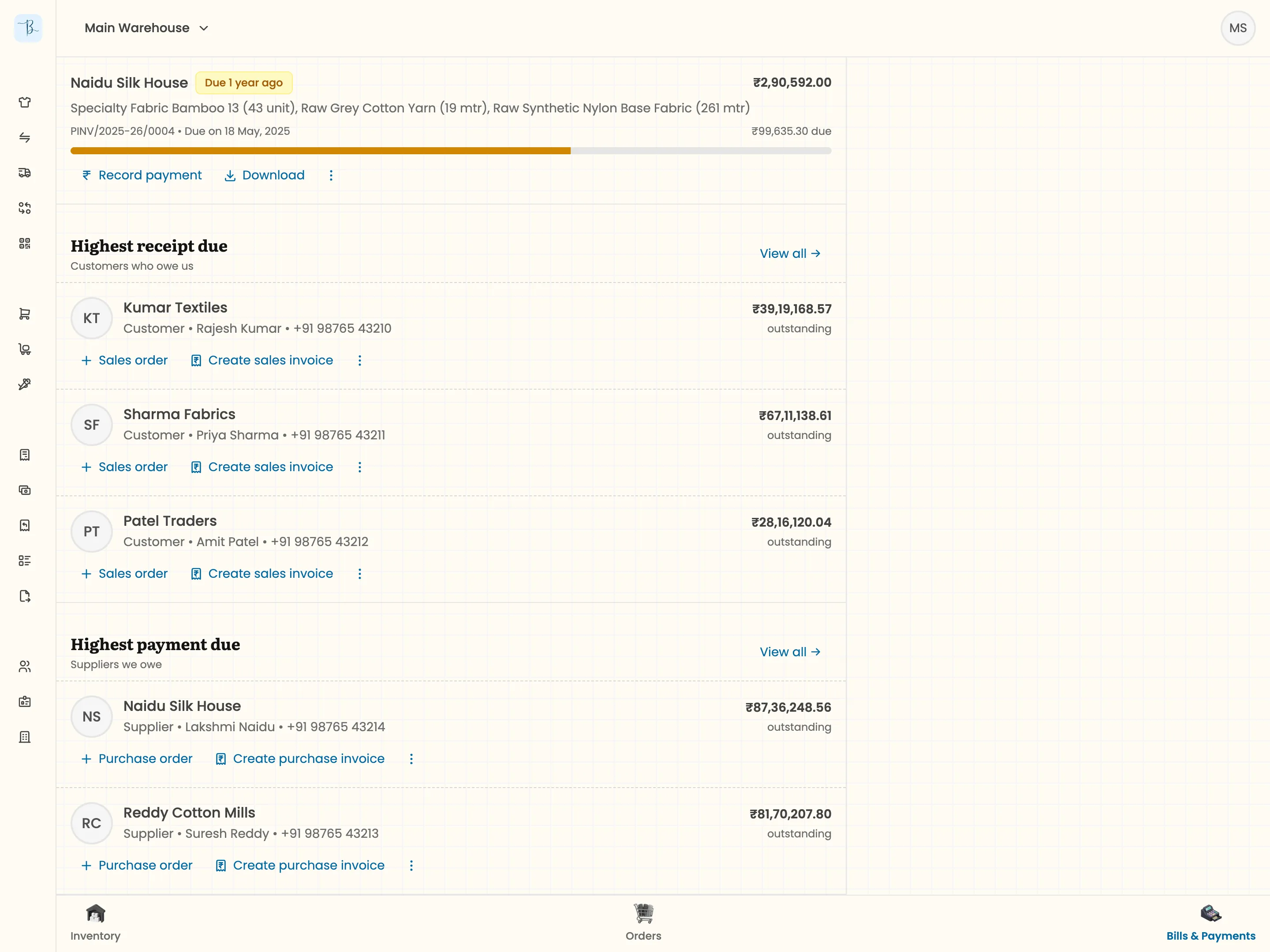
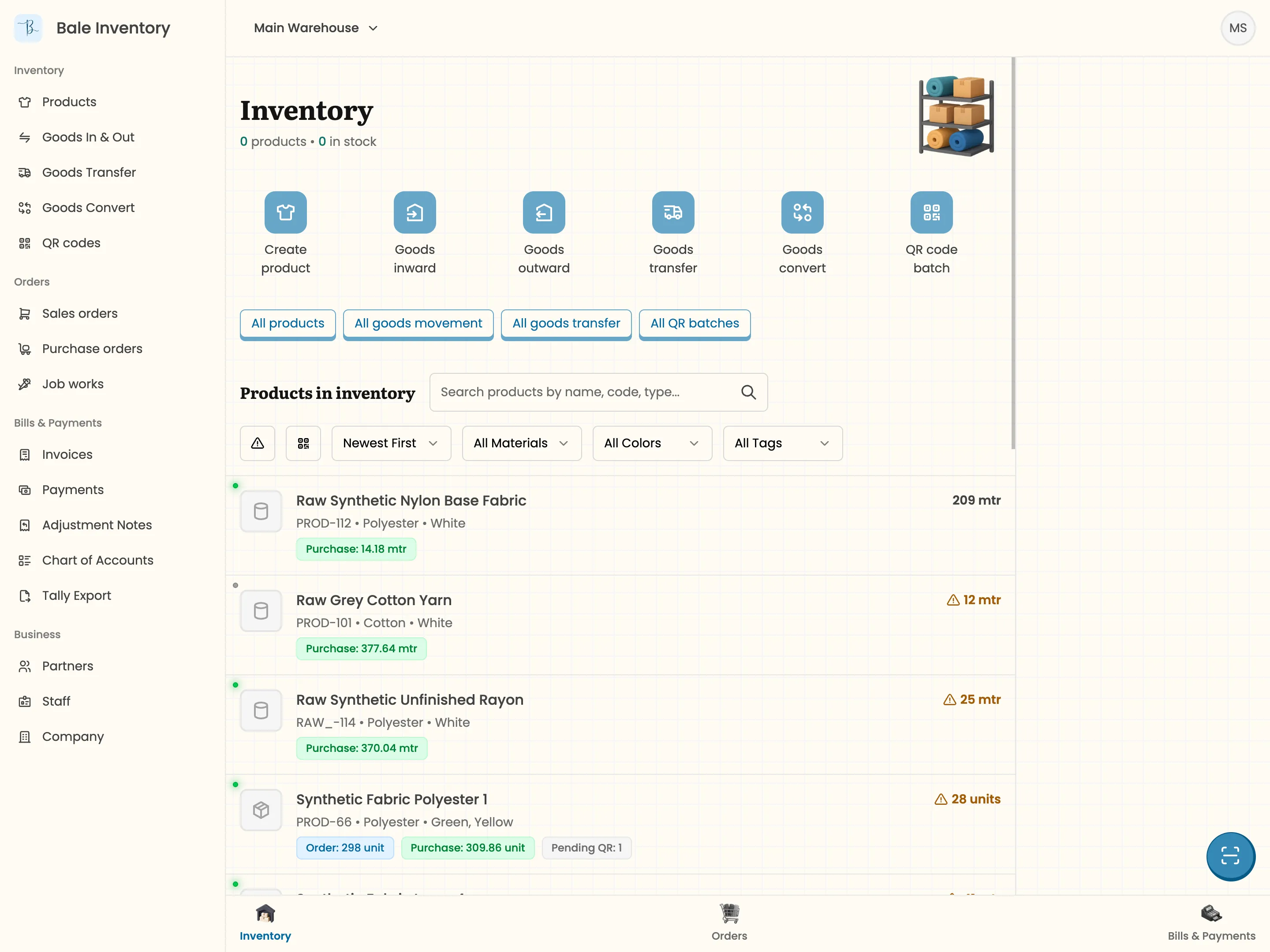
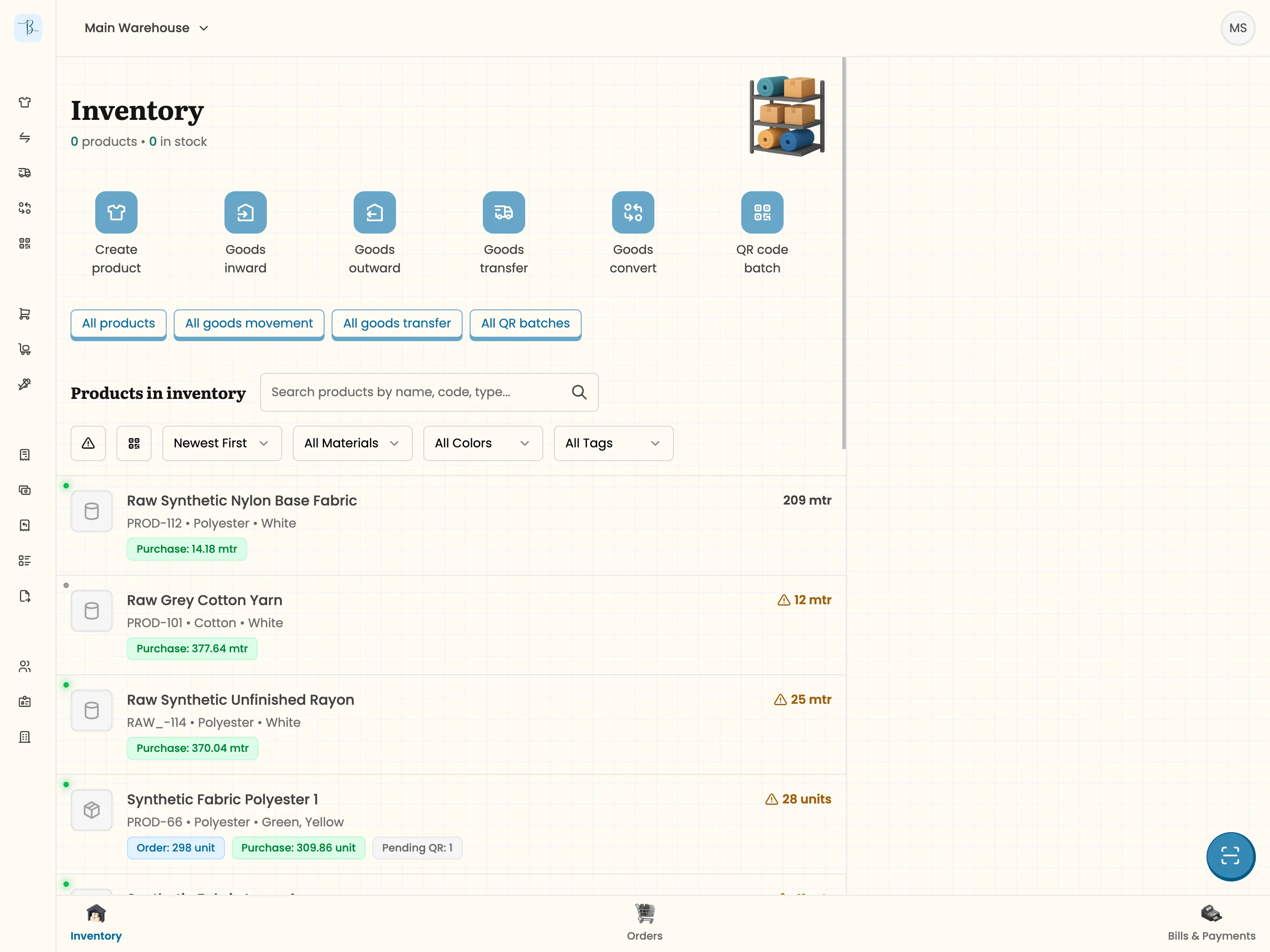
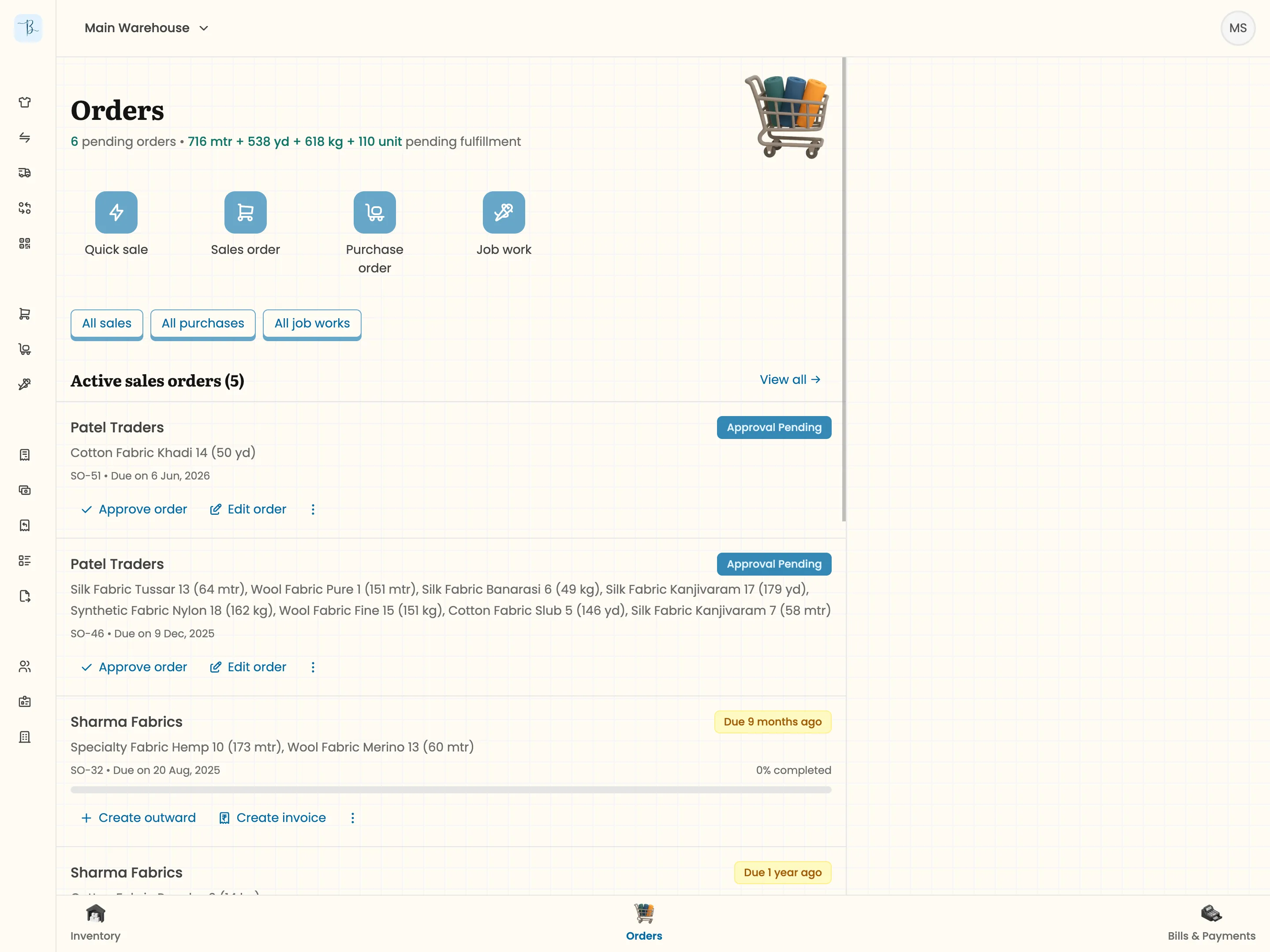
The current structure uses a bottom navigation bar with three items: Inventory, Orders, and Accounting. Each one opens a dashboard view. The inventory dashboard shows all products and quantities in the currently selected warehouse, with quick access to inward, outward, transfer, convert, and product creation. The orders dashboard surfaces the most pressing items: pending purchase orders, sales orders, and job work. The accounting dashboard shows pending invoices and partners with outstanding payments.
A left menu provides full access to all list pages, grouped under the same three categories plus a company section. And a warehouse dropdown at the top acts as a global filter. At any point, the user has one warehouse selected, and all records filter accordingly. This mirrors how traders mentally organize their work: one location at a time.
We also expanded from mobile-only to desktop support. Certain modules, especially reports, are simply better on a larger screen. The mobile-first philosophy gave way to the more pragmatic goal of meeting traders where they work, which turns out to be both places.
The Competitive Landscape
We evaluated three categories of existing solutions.
Generic billing apps like Vyapar serve retail and wholesale businesses broadly. They handle basic invoicing and inventory but have no concept of roll-based tracking, color and quality variants, or fabric-specific workflows like job work coordination. A fabric trader using Vyapar is constantly working around the software’s limitations.
Vastra is a textile-specific platform, but it targets retailers and clothing manufacturers rather than fabric intermediaries. It has an abundance of features, but most of them are disconnected record-keeping forms that don’t integrate with each other. The interface ignores fundamental usability heuristics, and while it technically handles job work, the implementation doesn’t hold up against real workflows.
TallyPrime isn’t a competitor. It’s the ecosystem we’re building alongside. Our entire export strategy makes Bale complementary to Tally, not a replacement. The trader uses Bale daily; the CA uses Tally for compliance. Both get what they need.
Where We Are Now
Most modules are complete. The Tally export feature is built but needs testing and refinement. We’ve set up a sample environment for our first user, the mutual friend whose problem started this whole project, and we’re preparing to approach the trader with 10,000+ rolls for a real implementation.
We’re also evaluating an e-way bill feature based on customer requests, and working on an AI-powered query system that would let traders ask natural language questions about their business data: total stock at a specific vendor, this month’s sales, outstanding amounts grouped by agent. It’s a genuinely difficult feature to get right. Natural language to SQL with business-specific context has high stakes because if it returns wrong numbers, traders lose trust immediately. It’s an active challenge.
For now, the plan is to implement with two real customers, observe the product in actual use, learn from what works and what breaks, and build enough confidence from that experience to sell to more traders. We’ve had four or five express interest, but we’re not approaching them until we’ve proven the product works in practice.
What I Would Do Differently
If I could change one thing about the process, I’d have talked to more people earlier. Ten-plus interviews over two months gave us a strong foundation, but with more resources, broader validation would have reduced the uncertainty I still carry about some decisions. The honest truth is that I believe the product is in a good state, but I won’t know for sure until traders are using it every day. That’s the next chapter.